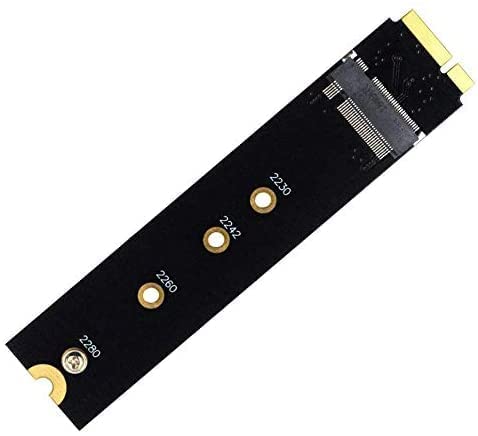
ETZIN M.2 NGFF B Key B+M Key Slot to 7+17 Pin Adapter Card, for MacBook Air A1465 A1466 (2012 Year only) SSD Replacement, HDD Converter Card Support Sata Based 2230 2242 2260 2280 SSD-(EPL-407HS)
Product Details
Upgrade your 2012 MacBook Air with the ETZIN M.2 NGFF Adapter Card. This converter allows you to use compatible M.2 SATA SSDs for a storage boost.
Key Features
- Replace your original SSD with a compatible M.2 NGFF SATA SSD.
- Designed specifically for MacBook Air A1465 and A1466 (2012 models).
- Supports M.2 SATA SSDs in sizes 2230, 2242, 2260, and 2280.
- Easy installation, no drivers required for your MacBook Air.
- Ensure your M.2 SSD uses a Sand-Force controller for compatibility.
Specifications
- Compatibility: MacBook Air A1465, A1466 (2012 Year only)
- SSD Interface: M.2 NGFF SATA (B Key or B+M Key)
- Supported SSD Sizes: 2230, 2242, 2260, 2280
- Adapter Dimensions: 109mm x 24mm
FAQs
Q. Which MacBook Air models is this adapter compatible with?
A. This adapter is for MacBook Air A1465 and A1466 models from the 2012 year only.
Q. What type of M.2 SSDs does this adapter support?
A. It supports M.2 NGFF SATA SSDs with B Key or B+M Key, and specific sizes like 2230, 2242, 2260, and 2280.
Q. Does this adapter work with PCIe NVMe SSDs?
A. No, this adapter only supports M.2 NGFF SATA based SSDs, not PCIe X2 or X4 transfers.
Q. Do I need to install any drivers for this adapter?
A. No drivers are needed for installation; simply turn off your MacBook Air and remove the battery before installation.
Price History
Track price changes over time


